



Virtual education opens the world to every student. While that world feels wide and limitless, the home learning space is more confined. To succeed in cyber school, students need an organized, comfortable environment that boosts focus, motivation, and academic success. PA Virtual Charter School embodies a diamond partnership model, which emphasizes the role of the learning coach and the importance of the home learning environment in supporting academic achievement.
Why a Dedicated Learning Space Matters
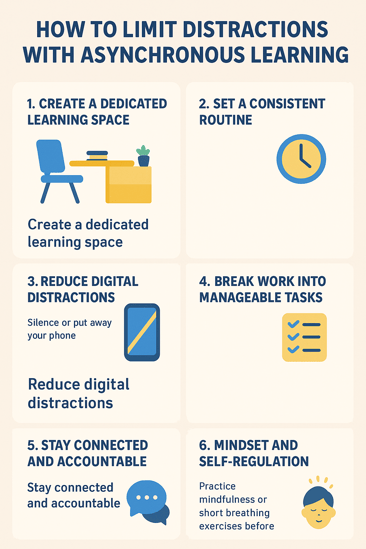
A student’s work environment forms the foundation of their daily learning experience. When this foundation is properly structured, the day can flow seamlessly. Start with a consistent space that supports routine and organization. This consistency benefits both the student and their learning coach, as all learning materials are easy to locate. The space should have minimal distractions, fostering a positive learning mindset. Personalize it with inspirational posters, banners, or backgrounds. A comfortable chair, desk, and a designated area for educational supplies provide essential starting points.
Choosing the Right Spot
We can envision this setup, but how do we select the right space within the home? Look for a quiet area away from high-traffic zones, avoiding spaces near televisions, kitchens, or the front door. The space should be well-lit, and you may vary the lighting throughout the day using sunlight, overhead lights, or lamps. Ergonomics are key for efficiency and comfort, consider options like standing desks, adjustable chairs, or yoga balls. In smaller homes, a study nook, foldable desk, bunk bed, or corner space can provide the necessary range while accommodating other uses of the room.
Organizing for Success
As mentioned earlier, an organized space supports both the student and learning coach. Items such as notebooks, pencils, headphones and chargers should be within easy reach. Chargers are extremely important throughout the day. Consider some of the more unique desk organizers that hold the charger in place. Bins, baskets and drawer organizers can assist with pencils and headphones. As binders and journals are added to the shelves, make sure both the books and shelves are labeled for quick identification. This will assist whenever a different learning coach needs to step in. Once your physical space is organized, work on the virtual setting. Within your Google Drive, create folders for each subject area. The subject folders can be further broken down into units, weeks or semesters. Ensure any document you create or copy has the proper title so that it can be easily categorized and found. Google drive, along with other frequented programs, should be bookmarked within the browser.
Personalizing the Space
The learning space should be uniquely yours, a place you enjoy seeing and embracing each day. Include artwork, posters, and items that reflect your personality and interests. Just like in a brick-and-mortar school, the space can feature inspirational quotes and motivating statements that you rotate throughout the seasons. All decorations should strike a balance between creative touches and minimizing distractions. Leave out mini basketball hoops, gaming systems, and flashing lights. Instead of distracting fidget materials and décor, focus on ergonomic options. Enjoy movement? Try a standing desk, yoga ball, or flexible chair. Prefer a cozy, relaxed feel? Swap the bed or couch for a comfortable chair with a pillow, or use a cross-legged chair with a blanket. As the space develops, personal learning styles and interests will become more apparent, fostering a sense of ownership and pride in the workspace.
Minimizing Distractions
We’ve discussed limiting physical distractions, but what about auditory and technology distractions? In homes with multiple learners, noise can be a challenge. Students can use noise-canceling headphones with built-in microphones to keep their voices clear in the virtual classroom. White noise machines or noise apps can also help, ideally placed near the door to block out additional sounds.
Technology is an essential part of online learning, but it can also be distracting. Encourage students to keep cell phones away from their learning space, accessing them only during breaks and lunch. Desks should be positioned away from televisions or gaming units, which can be both visual and auditory distractions.
Asynchronous learning—when students complete work independently, can sometimes lead to irritability or difficulty concentrating. Establish consistent routines for this time, incorporate mindfulness practices like breathing exercises or yoga breaks, and set clear goals for each session. Using an alarm or timer can help manage work periods and break times effectively.
Creating a Positive Learning Atmosphere
A positive learning atmosphere involves both the physical space and emotional energy. Students tend to feel more alert when there is ample lighting and supportive seating. They focus best on course material when they are comfortable, which includes calm surroundings, ergonomic seating, and a desk set to the correct height.
Mental comfort is equally important. Create a “success board” to track goals and celebrate achievements across subjects. This can include assignment completion, time spent on homework, or overall grades. Break goals into small, manageable steps, and consistently celebrating these successes helps build a positive mindset that carries over to larger tasks.
Physical activity is the final piece of a productive learning environment. The CDC explains that movement improves attention and memory in children while reducing the risk of depression and negative thoughts. Encourage brain breaks throughout the day with activities like standing or chair yoga, stretching, treadmill walking, or a brisk walk outside to get the body moving for a short period.
Involving the Whole Family
At PA Virtual Charter School, the diamond model of partnership ensures that students, parents, and learning coaches have access to valuable resources, support, and information to make learning effective. Supporting students involves careful planning of routines and accountability. Take time to discuss daily schedules and translate them into a visual chart displayed in the student’s learning space. Siblings can follow these routines as well, helping to support the learner and engage in necessary educational activities.
Learning coaches and parents should model good daily practices by maintaining their own routines, using timers and alarms, and keeping their spaces organized. When students see how effective organization and time management are in the home, they are more likely to adopt the same strategies in their own learning environment.

Maintaining and Adjusting Over Time
Regularly updating the learning environment boosts morale and allows for a more personalized approach to learning. Maintaining and adjusting the space over time encourages family involvement, fosters a positive atmosphere, and enhances organization. Use this time to reflect on what is working and what isn’t. Perhaps the student needs a change in location to improve focus or better lighting during the darker winter months.
Consider hanging seasonal decorations or updating school photos. Refresh goal charts and schedules, repair any curling or torn labels, and clean the space with sanitizing wipes, new scents, or a quick vacuum. Adapting and updating the learning environment is not only okay, it’s encouraged. Flexibility is a key component of successful virtual learning.
A productive learning space is key to a positive virtual school experience. Create your learning space in your own unique way. Ensure it is functional with plenty of storage and space for those laptops and materials. It should be an inspiring space with uplifting quotes. Make the space reflect personal interests as well as goals. This is a team effort! Make sure the whole family is involved in the set up of the daily routine. If you need additional assistance setting up your virtual day, remember that PA Virtual Charter School depends on a partnership model. Resources are readily available to assist you in your online education journey.
Comments